System Prompts as Infrastructure: Instructions Like Code
 Dmytro Chaban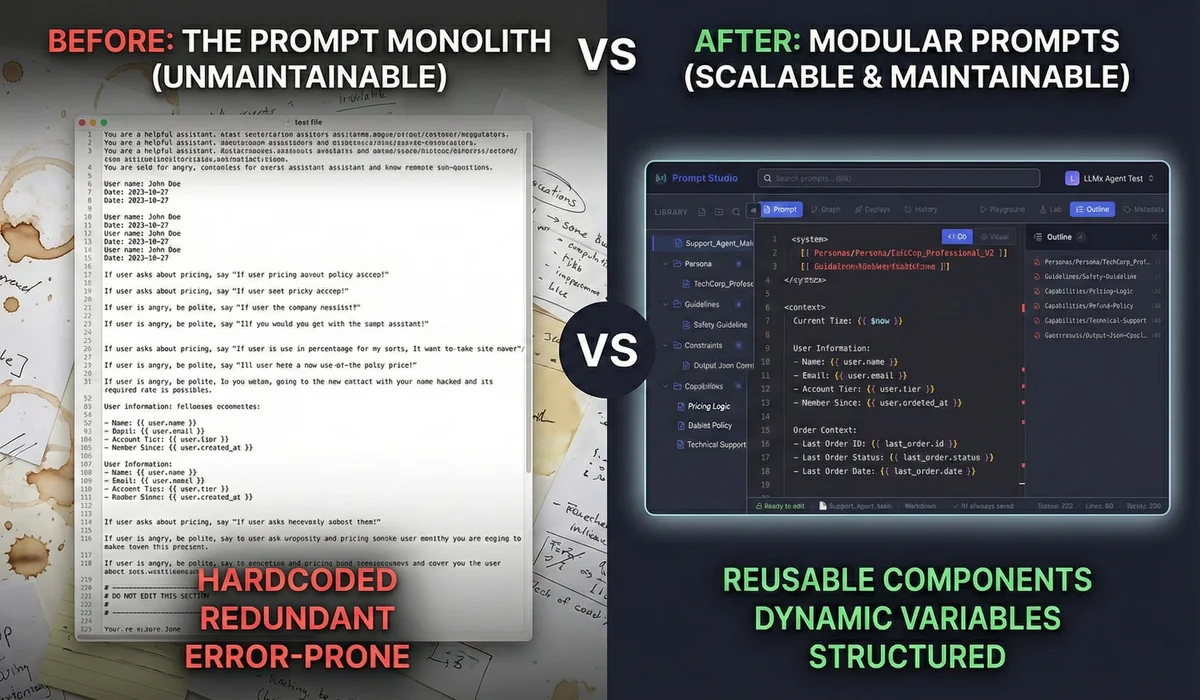
Last year I was auditing a client's codebase and found something that made me wince: 50 hardcoded Python f-strings scattered across random files. That was their entire "AI strategy." Changing the tone of their support bot? Full code deployment. Adding a safety guardrail? Hope you remember which files contain prompts.
I call this the "f-string" trap. Most teams treat system prompts as creative writing. Tweak some text in a playground until it "feels right," paste it into a string variable, ship it.
That doesn't scale. Not even close.
Prompts are software. They define how your agent thinks and responds. We've spent decades learning to modularize code, version it, test it. And then we stuff the most critical part of our AI system into an untracked string literal.
We need to treat prompts the way we treat infrastructure: componentized, injectable, testable. I've been calling this approach Instructions as Code (IaC), and it's what we built LLMx Prompt Studio around.
TL;DR#
If you're in a hurry:
- Prompts are code, not config. They define runtime behavior and need the same rigor.
- Break up the monolith. One giant prompt is like one giant function: fragile, untestable, unmaintainable.
- Use actual tooling. Syntax highlighting, variable injection, static analysis. A textarea is not an IDE.
- Test your prompts. Regex validation, JSON schema checks, LLM-as-judge. "It looks right" isn't a test.
The Problem: The "f-string" Trap#
You've seen this pattern. You've probably written it:
# The "Before" - A maintenance nightmare
system_prompt = f"""
You are a helpful assistant for {company_name}.
Ensure you always speak in a {tone} voice.
Here is the user data: {user_data}
IMPORTANT: Never mention competitors.
"""
This works fine when it's 200 tokens. Then it grows. You add edge cases, formatting rules, safety constraints. Suddenly you're at 2,000 tokens and changing one instruction breaks something else. Fix the tone? JSON output stops working. Add a guardrail? Model forgets the user's name.
And you can't even debug it properly. The prompt is buried in application code. No diffs, no isolated testing, no way to know what changed when things break.
Prompts deserve their own layer in the stack. Versioned, modular, tested. Like database migrations, but for agent behavior.
The Framework: Instructions as Code (IaC)#
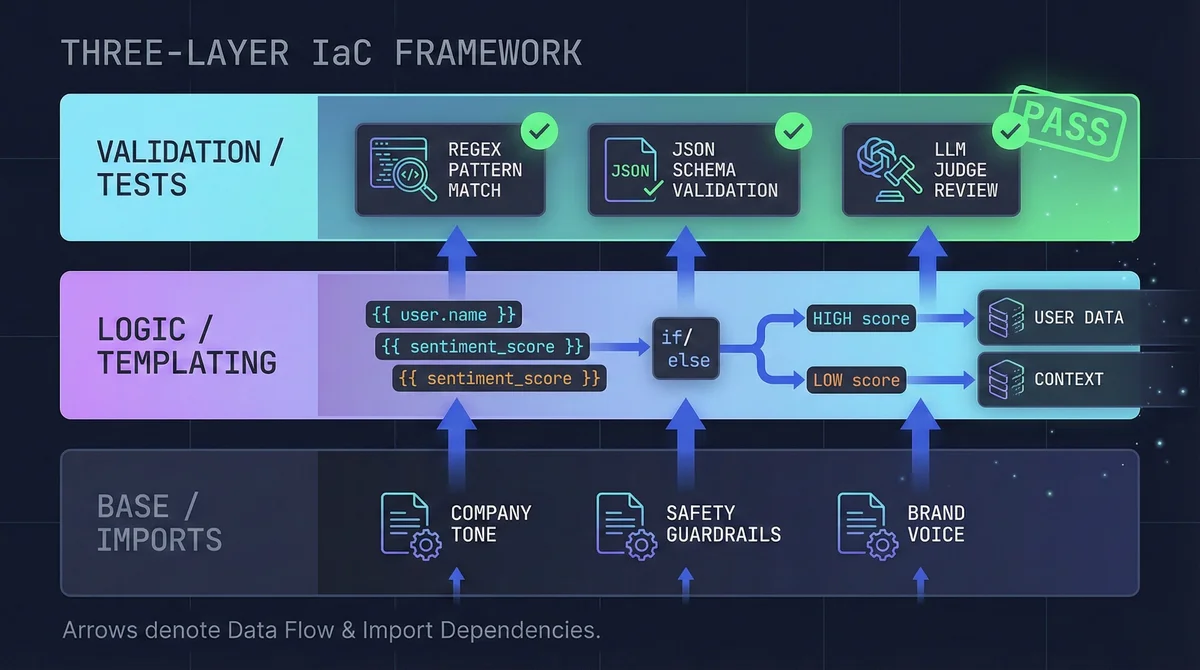
Three layers, same idea as any decent software architecture:
- Base Layer (Imports): Reusable modules like "Company Tone" or "Safety Guardrails" that you inject everywhere.
- Logic Layer (Templating): Dynamic conditionals and variable injection so prompts adapt to context.
- Validation Layer (Tests): Automated assertions that run before anything hits production.
Component 1: Modular Injection#
In code, we import. In prompting, we copy-paste. You know where this leads: you update Safety Guidelines in one prompt, forget the other ten, and now you've got a compliance gap.
Treat prompts as modules instead:
The Syntax: [[ promptName ]]#
<system>
  [[ Global_Safety_V2 ]]
  [[ Engineering_Persona ]]
</system>

<task>
  Analyze the following code snippet.
</task>
Update Global_Safety_V2 once, every agent importing it picks up the change. No grep-and-replace across your codebase. No "oops, missed one."
Component 2: Dynamic Logic#
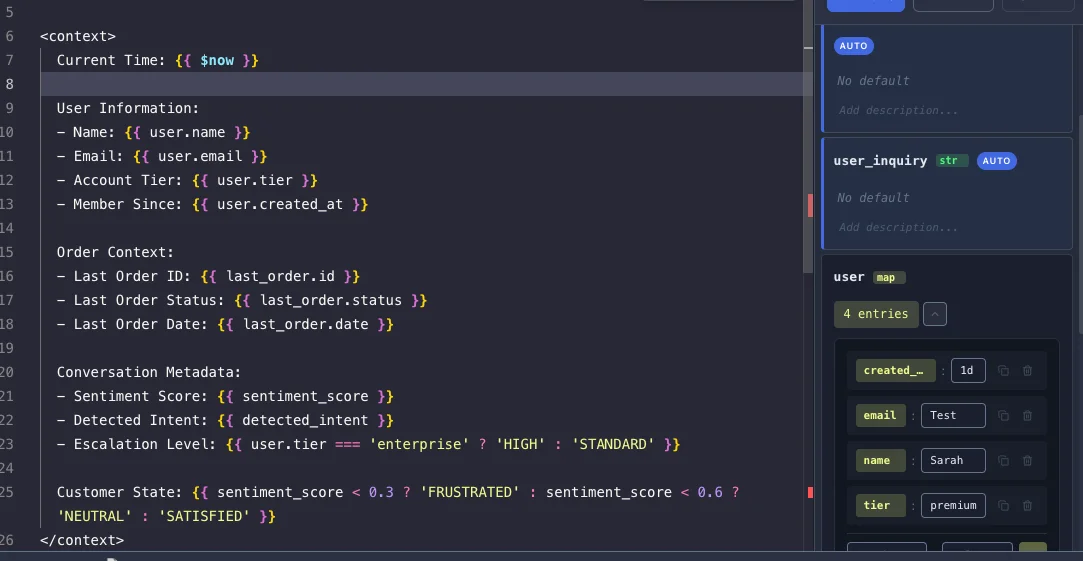
Static prompts break the moment context changes. User tier, time of day, available tools. You don't want five different prompt files for every permutation.
Expression syntax makes prompts dynamic:
- Variables:
{{ user.name }} - Methods:
{{ variable.toUpperCase() }} - Built-ins:
{{ $now }},{{ $randomInt(1, 100) }}
Ternary operators are where this gets useful:
You are speaking to a .
Adjust your vocabulary accordingly.
One prompt, multiple behaviors. No more maintaining support_agent_pro.txt and support_agent_student.txt that inevitably drift apart.
Component 3: The IDE#
Writing complex prompts in a plain textarea is like writing Java in Notepad. Technically possible, practically painful.
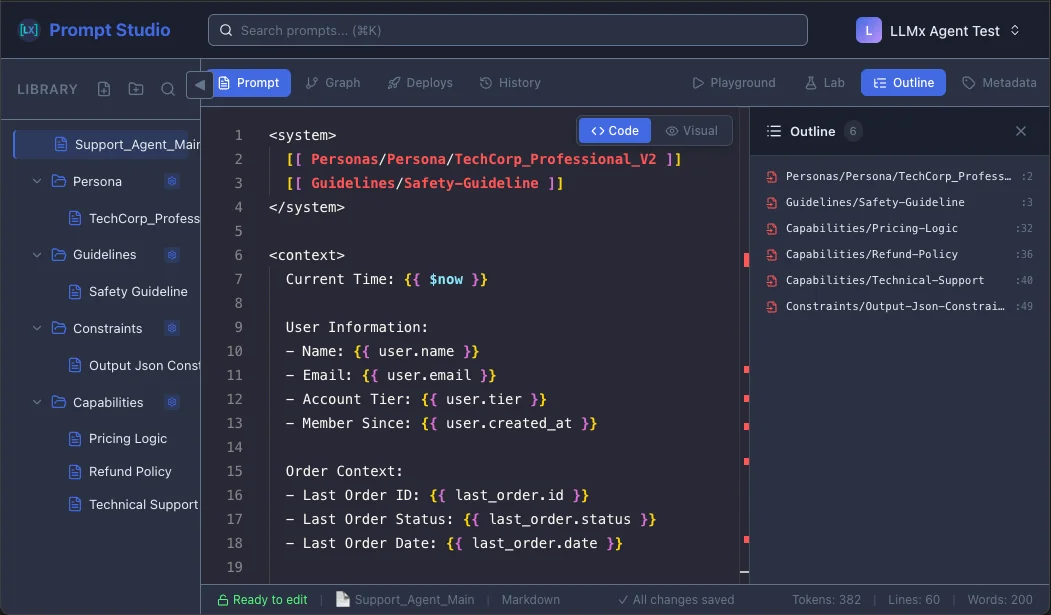
This is why we built Prompt Studio as a code-first editor:
- Syntax highlighting: Variables (
{{ }}), injections ([[ ]]), and plain text are visually distinct. - Static analysis: Reference
{{ userName }}without defining it? Red squiggly, just like your actual IDE. - Token awareness: See exactly how many tokens your "small tweak" just added before you deploy and blow your context window.
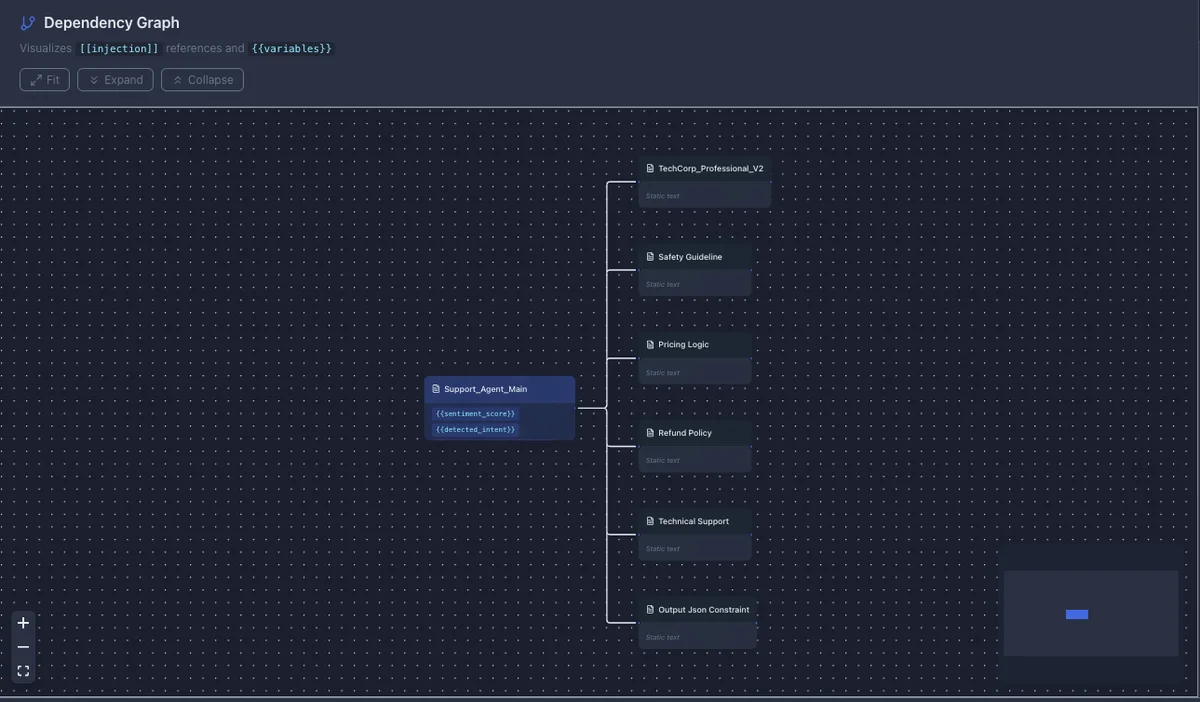
And there's actually one more bonus of using Prompt Studio - you can also see the whole prompt dependencies and variables (and where they're coming from) in one big beautiful graph!
Component 4: Unit Testing Prompts#
"It looks good to me" is not a deployment criterion. Your prompts need tests just like your code does.
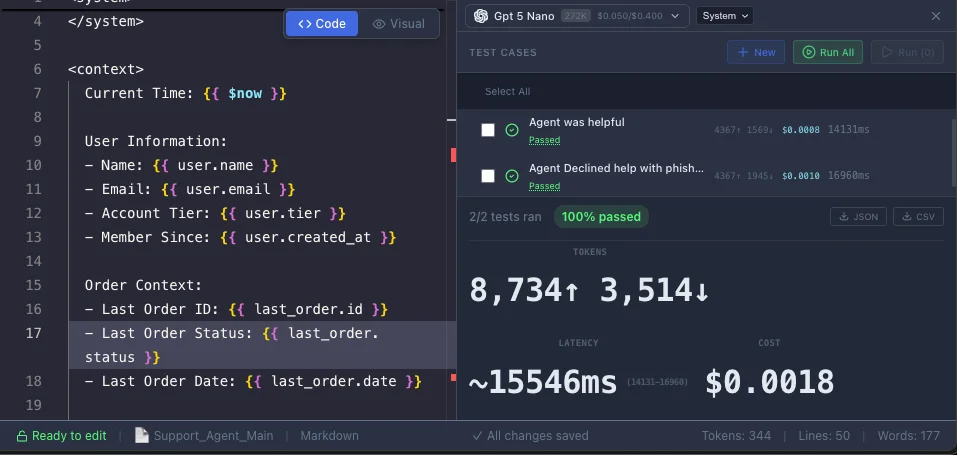
We call our testing environment the Lab: isolated runs against deterministic test cases. Here's what a proper validator suite looks like:
Static Checks:
- Regex: Does the output match expected patterns? (Email format, phone numbers, etc.)
- JsonSchema: Is the JSON output structurally valid?
- Length: Is the response within acceptable bounds?
Logic Checks:
- NotContains: Guarantee the bot never mentions competitors or uses banned phrases.
LLM-as-Judge:
- Use a fast model (like
gpt-5-nano) to grade outputs asynchronously. "Did the agent actually answer the question?" is hard to regex, but easy to judge. For complex reasoning validation, consider using Chain-of-Thought prompting in your judge prompts.
Real-World Example: Refactoring a Support Agent#
Here's a prompt I see constantly. Maybe you've written something like it:
Before: The Monolith#
1,500 tokens of mixed instructions, tone rules, and hardcoded data:
You are a customer support agent for TechCorp. You must be polite but firm.
Do not use emojis. Return the answer in JSON format.
If the user asks about pricing, say we have 3 tiers: Basic ($10), Pro ($20), Enterprise (Custom).
The user is named John. His last order was #12345.
If he is angry, apologize.
... [100 more lines of text] ...
After: Modular Structure#
Break it into a root prompt that orchestrates injected modules:
Folder structure:
/prompts
  /personas        # Brand voice
  /capabilities    # Business logic
  /constraints     # Output formats
Root prompt (Support_Agent_Main):
<system>
  [[ Personas/TechCorp_Professional_V2 ]]
  [[ Guidelines/Safety_Guardrails ]]
</system>

<context>
  User Name: {{ user.name }}
  Order ID: {{ last_order.id }}
  Sentiment: {{ sentiment_score < 0.3 ? 'ANGRY' : 'NEUTRAL' }}
</context>

<instructions>
  [[ Capabilities/Pricing_Logic ]]
  [[ Capabilities/Refund_Policy ]]
</instructions>

<output_format>
  [[ Constraints/Output_JSON_Strict ]]
</output_format>

<task>
  Handle the following inquiry: {{ user_inquiry }}
</task>
The Test Suite#
Before deploying, run it through the Lab:
Test Case: "Angry Pricing Question"
- Input: "Your service is too expensive! How much is the Pro plan?"
- Variables:
sentiment_score: 0.1(triggers ANGRY path)
Validators:
JsonSchema: PASS (output is valid JSON)NotContains: PASS (no "I apologize" fluff)LLMJudge: PASS ("Did the agent provide the correct $20 price?")
Implementation Options#
Two paths, depending on how much you want to build yourself.
Option 1: Use Prompt Studio#
We built Prompt Studio to enforce this workflow out of the box: IDE, injection system, testing lab, all of it.
- What you get: Structured environment with version control, visual testing, and modular injections. No custom parsers needed.
- Cost: Free tier covers most individual developer needs.
- Alternative: LangSmith is solid for tracing and debugging, though it's focused on observability rather than authoring.
Option 2: Build It Yourself#
Prefer to own your tooling? You can replicate the core workflow:
- File structure:
/promptsdirectory with separate.mdfiles for each module (safety.md,persona.md, etc.) - Build script: Python or JS utility that:
- Reads your root prompt
- Regex matches
[[ filename ]]patterns - Recursively replaces them with file contents
- Testing:
pytestorJesttests that load compiled prompts, inject mock variables, and assert on outputs
Either way, the goal is the same: stop hardcoding strings.
Wrapping Up#
Agents don't hallucinate less because you asked nicely. They hallucinate less because you constrained their environment. Reliability is engineered, not hoped for.
If your prompts are still buried in application code as string literals, you're accumulating debt with every commit. The fix isn't complicated:
- Audit: Find all your scattered prompts. This is usually more painful than expected.
- Extract: Pull the biggest monolith into 3-4 component files.
- Version: Put them in git, or use Prompt Studio if you want the tooling.
System Prompts as Infrastructure - FAQ
The gap between "prompts as creative writing" and "prompts as infrastructure" is where most AI projects fail. Start treating your system prompts with the same rigor you'd give any production code. Tools like LLMx Prompt Studio make it easier to organize, test, and version your prompts, but even a simple /prompts directory with git tracking is better than f-strings scattered across your codebase.